

MyRewards
Chore chart & pocket money for kids and teens

Chores done, without the nagging.

Your kids, from little ones to teenagers, tick off their chores. You approve in one tap. The points they earn turn into the rewards and pocket money your family agrees on.

Download on the App Store Get it on Google Play
  • Free
  • No ads
  • iPhone, iPad and Android
  • No account for kids

How it works

  1. You set the choresand what each one is worth. Starter chores for each child's age, up to the teenage years, are ready in two minutes.
  2. They tick them offon their own tablet or phone, or yours. No email or account needed.
  3. You approvein one tap, with a word of praise if you like.
  4. Points become rewardsan ice cream, a later bedtime, movie night, or pocket money.
For kids and teens

A goal worth working for

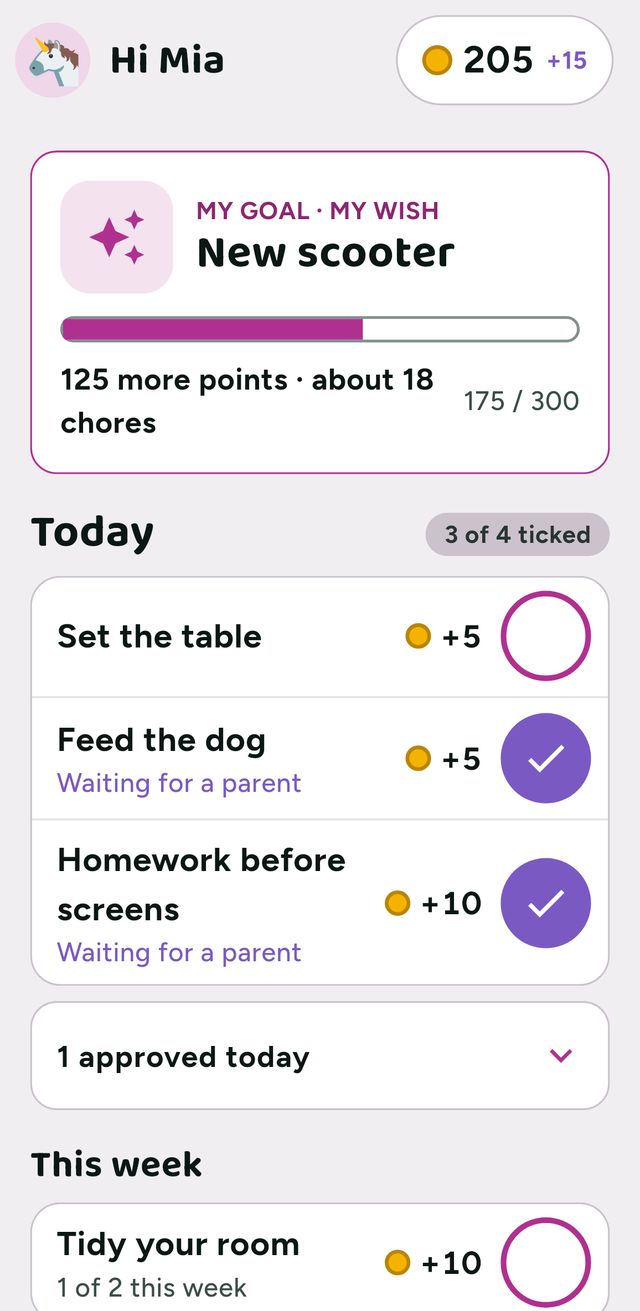
Their goal sits at the top of the screen, with a bar that fills as they earn and roughly how many chores to go. Every tick moves them closer.

  • Tap the circle to tick a chore, with Undo if they slip
  • Points on the way show straight away, before you approve
  • Levels, and streaks that forgive a bad day
  • Their own colours and picture
A child's Today screen: a goal card for a new scooter with a progress bar, then today's chores with tick circles.
For parents

Approve in one tap

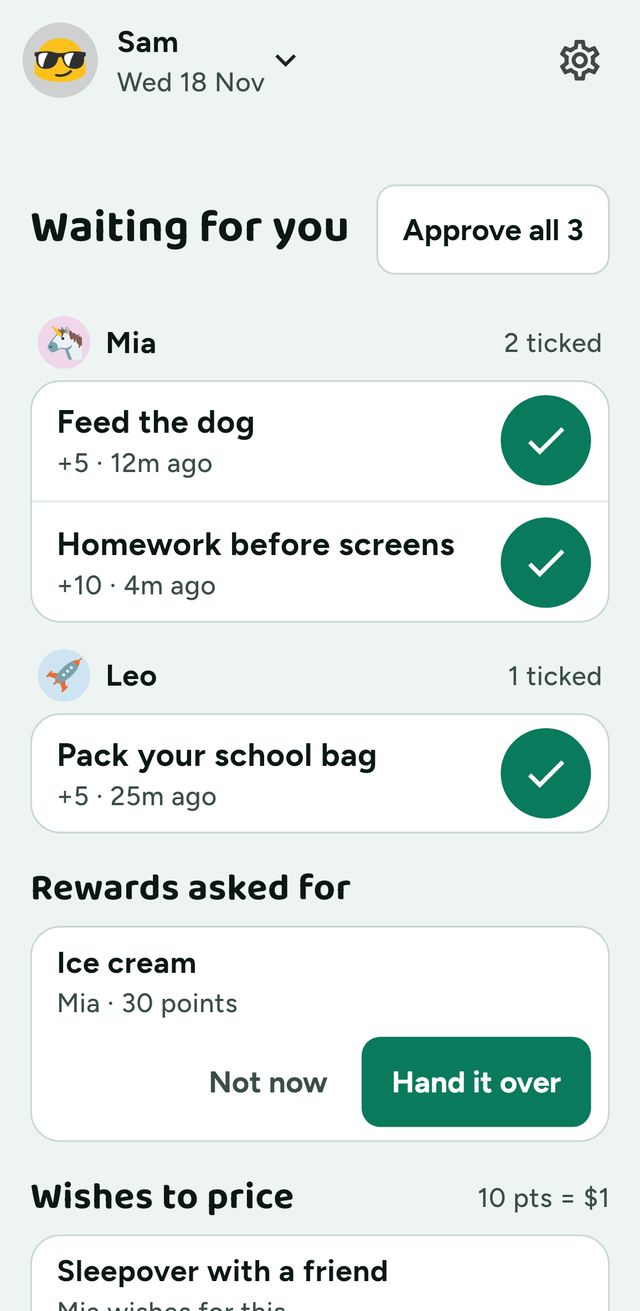
Everything waiting for you is in one place, grouped by child, with how long it has waited. Approve with a tap, and the points land on their screen.

  • Send a few words of praise with a tap
  • Part points, or "not yet" with a reason they'll see
  • Approve all at once when you trust the lot
  • Undo if you change your mind
A parent's Today screen titled Waiting for you, with chores grouped under each child and a round tick button beside each.
For kids and teens

They save for what they want

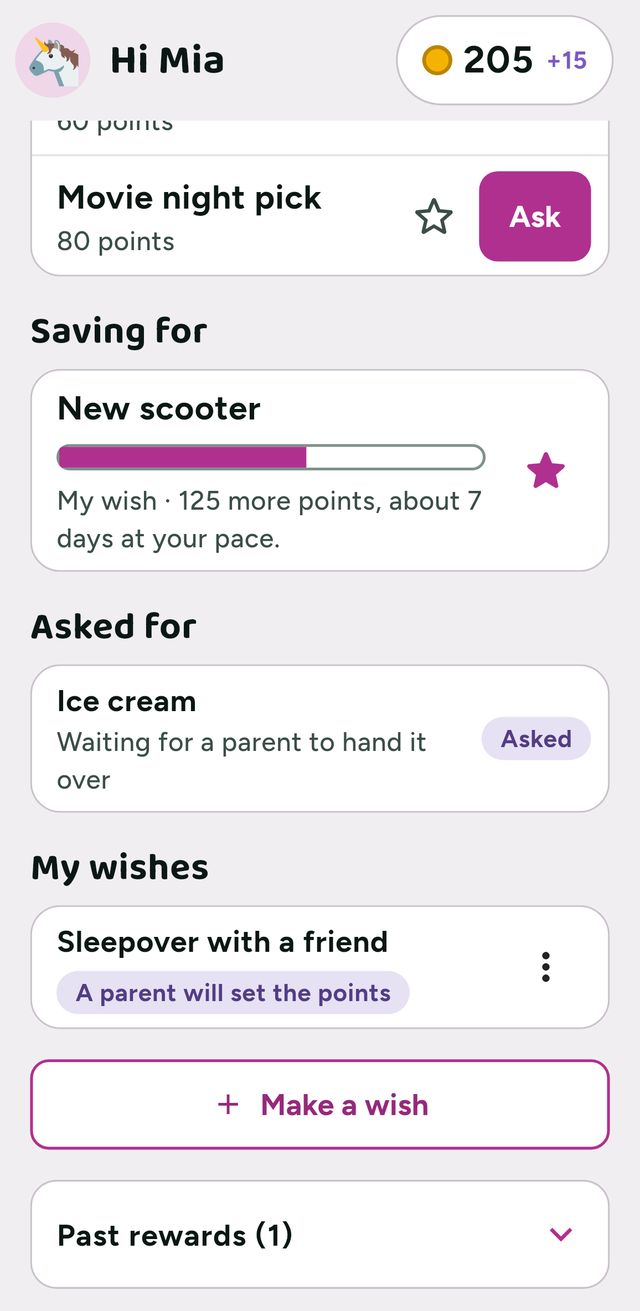
You set the rewards and their points price. Kids see what's ready now and how close they are to the rest, and ask when they have enough.

  • Rewards for everyone, or just for one child
  • Kids can make a wish; you decide what it costs
  • Star a reward to make it their goal
A child's Rewards screen with rewards ready now and rewards they are saving for, each with a progress bar.
For the whole family

Notice the good stuff

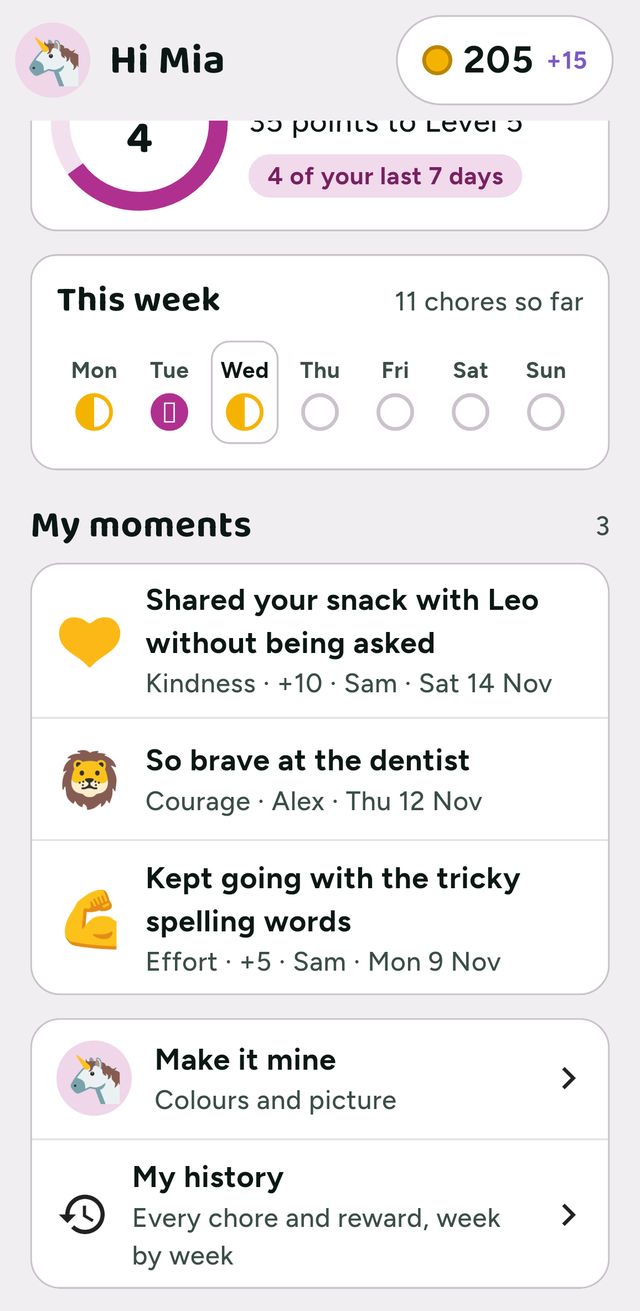
Not everything worth noticing is a chore. Recognise kindness, courage or a big effort with a moment and a short note, with points if you like. Children keep every one on their own wall.

A child's Me tab showing their level and a wall of moments such as kindness and courage, with notes from parents.
For parents

Know the moment it's done

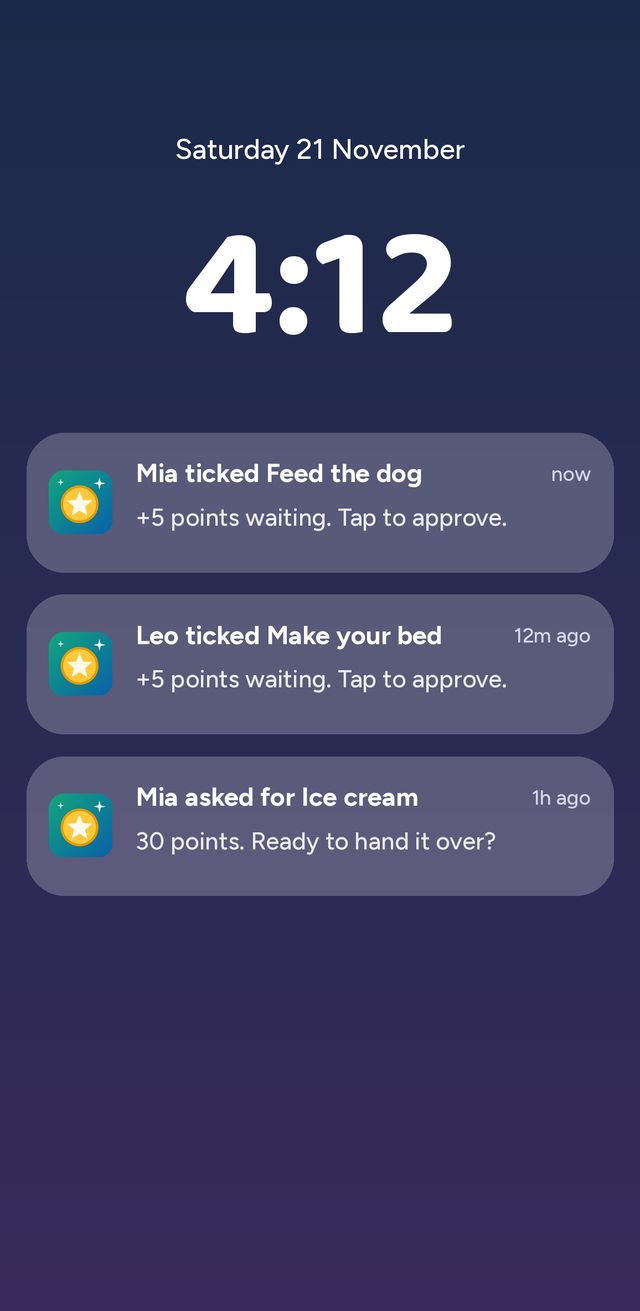
A quick note when a chore is ticked or a reward is asked for, and none at night. Children hear when you approve.

  • As it happens, once a day, or off: each parent chooses
  • Family quiet hours
  • A gentle daily reminder on your child's device
A phone lock screen with MyRewards notifications: Mia ticked Feed the dog, Leo ticked Make your bed, Mia asked for Ice cream.
For parents

Payday, sorted

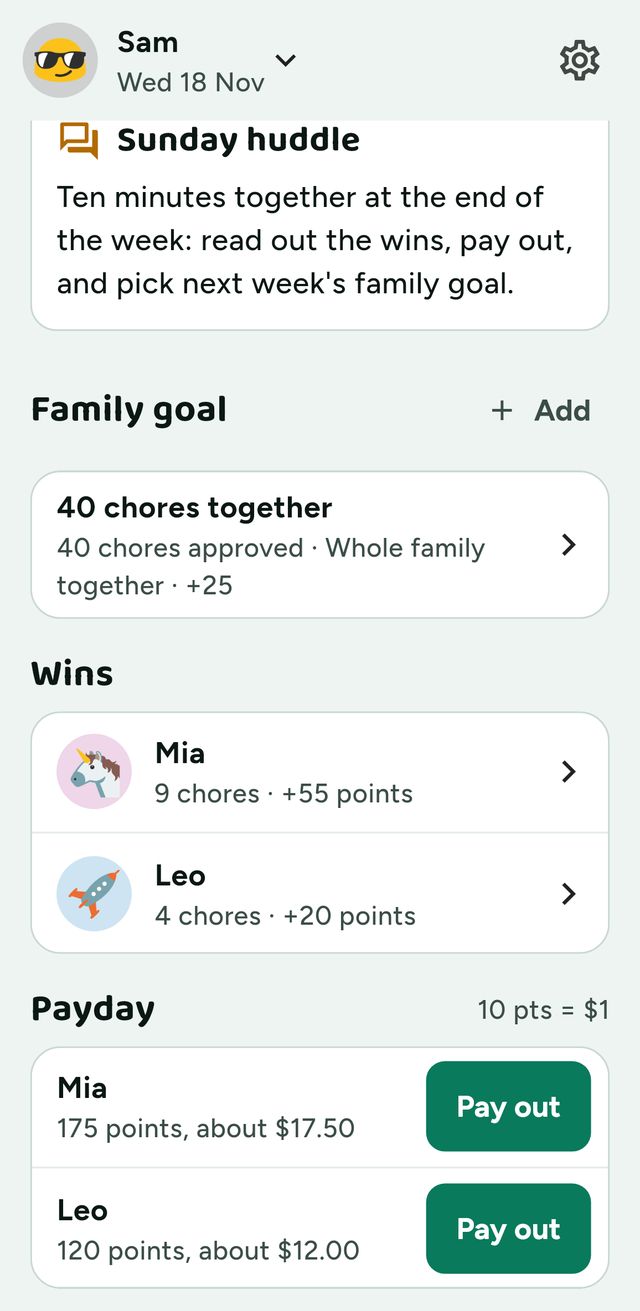
The week in one view: each child's wins, a family goal everyone works on together, and payday. You choose what a point is worth, and every payout is recorded.

  • Family goals, never sibling leaderboards
  • Balances never go below zero
  • Penalties stay off unless you turn them on
The Week tab with a family goal of 40 chores together, each child's wins, and a payday section.
Next update

Made for teenagers too Coming soon

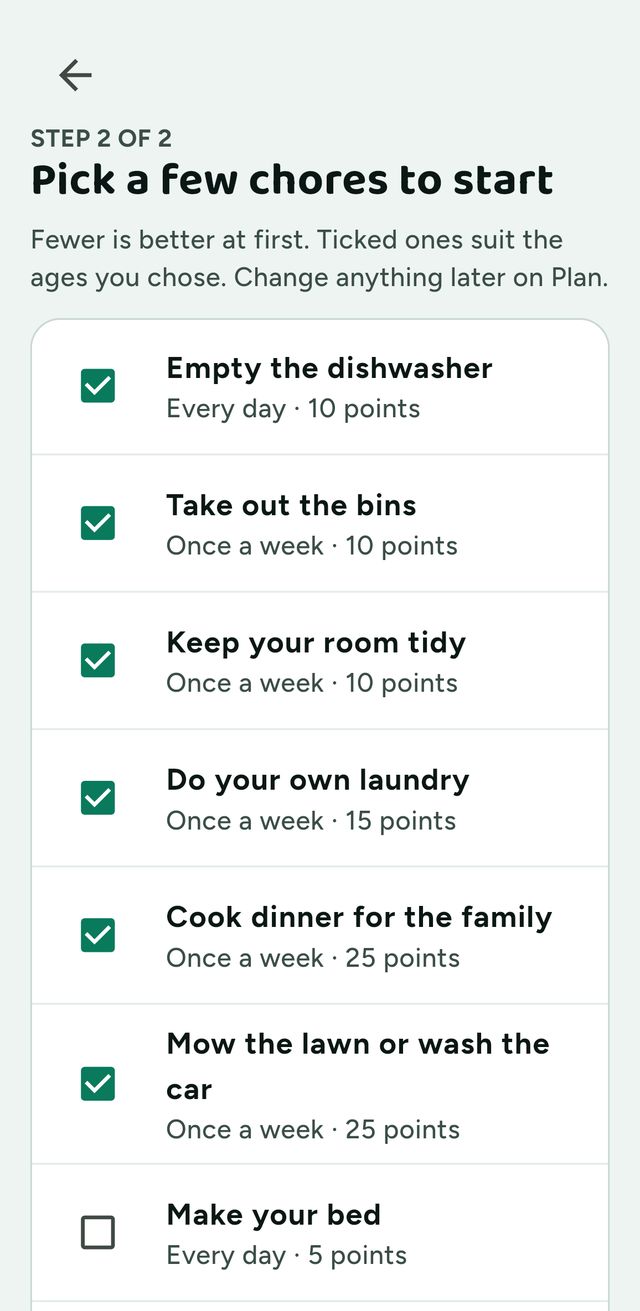
A 14 to 17 age range with chores that suit teenagers: their own laundry, cooking dinner, mowing the lawn. And a points rate for each child, so a teenager's effort can be worth more.

  • "I did something extra": they tell you about jobs that weren't on the list, and you give points or simply say thank you
  • See roughly what each child can earn in a week
Setup screen for a teenager with starter chores ticked: empty the dishwasher, take out the bins, keep your room tidy, do your own laundry, cook dinner for the family.

Made for real family life

Busy mornings, shared tablets, two parents on different phones. MyRewards fits around how your house already works.

One phone or everyone's own

Share your phone, or pair a tablet or old phone with a six-character code.

Works without Wi-Fi

Kids can tick chores offline. They sync as soon as the device is back online.

Every grown-up can help

Invite a partner, grandparent or carer. Adults can join in too, approved by someone else.

Ready in two minutes

Add your kids and their ages, little ones to teens, and pick from starter chores that suit them.

Every point accounted for

Who approved what, every reward and every payout, week by week.

Easy to read

Works with larger text sizes and screen readers, on iPhone, iPad and Android.

No ads. No tracking. Nothing sold.

Your family's chores and points are for your family. We use them only to run the app.

Read the privacy policy

  • Children never need an email or an accountTheir device joins with a short code from you.
  • Only your family can see your familyThe guardians you invite and the devices you pair.
  • Delete everything, any timeFrom inside the app, in a few taps.

Questions parents ask

Is MyRewards free?

Yes. It's free to download and use, with no ads.

What ages is it for?

Children from about 5, right through to teenagers. The next update adds a 14 to 17 age range with chores for teens, and lets you give an older child their own points rate.

Does my child need their own phone?

No. They can use your phone or a shared tablet, and you switch to them in a tap. If they have their own device, you pair it with a short code. They never need an email address.

Does it handle real money?

No. Points are a record you control. You decide what a point is worth and pay pocket money your own way; MyRewards keeps a record of every payout.

Can both parents use it?

Yes, and grandparents or carers too. Each grown-up has their own sign-in, on iPhone or Android, and everyone sees the same family.

What happens when we miss a day?

Nothing dramatic. Streaks only count the days a chore is due, and you can give a day off. Balances never go below zero, and penalties are off unless you choose to turn them on.

Where can I get help?

See the guide to how MyRewards works, or contact support.

Try it for one week.

Set it up tonight in two minutes, and see how tomorrow morning goes.

Download on the App Store Get it on Google Play